White Riverway Adventure Pass
Get Out, Check In, and Win Prizes!
Get out, check in, and win prizes! With the White Riverway Adventure Pass, you’ll earn exclusive real-world rewards including park and attraction stickers, posters, and shirts by visiting the dozens of parks and attractions of the White Riverway or engaging in activities and volunteer efforts along the White River in Indianapolis and Hamilton County. It’s free and mobile-friendly with no app to download! Sign up today.
Valid April through October 2026 while reward prizes last.
The 2026 White Riverway Adventure Pass launches April 1, 2026.
How to Earn Rewards
Parks, Destinations, Activities,
Once you sign up (be sure to enable GPS/location services!), save the pass to your phone’s home screen (or bookmark it) so you can easily access. In the pass, you’ll see a list of eligible places or ways to earn. You can earn rewards three ways simply by using your phone while you’re out enjoying the White Riverway:
- Visiting one of the free parks of the White Riverway and using your phone’s GPS to check-in. For each park you visit, you’ll earn 100 points.
- Visiting one of the destinations or activities on and along the river and using your phone’s GPS to check-in. For each destination or activity you visit, you’ll earn 100 points.
- Volunteering to improve the health of the river at eligible volunteer activities and scanning a QR-code provided at the event. For each volunteer activity, you’ll earn 400 points.
Prizes
Stickers, Posters. Shirts,
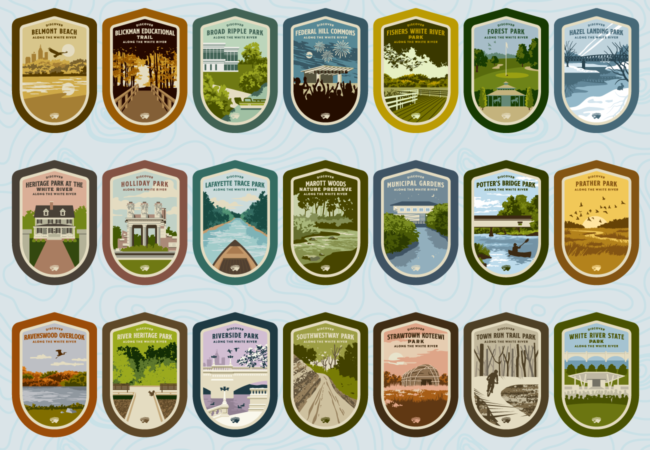
As envisioned by the White River Vision Plan, the White Riverway is a national park-like network of natural, cultural, and community experiences along the White River, and this year we’re celebrating 28 of those places with national park-inspired badge artwork! With each check-in, you’ll earn points you can redeem for park and destination stickers, a Riverway badge poster, and a White Riverway t-shirt.
Stickers
These durable 2×3 inch weather resistant vinyl stickers are perfect for water bottles, laptops, and anything else you want to show your love for your favorite riverfront place. Available for 28 Riverway parks and destinations.
100 points each
T-Shirts
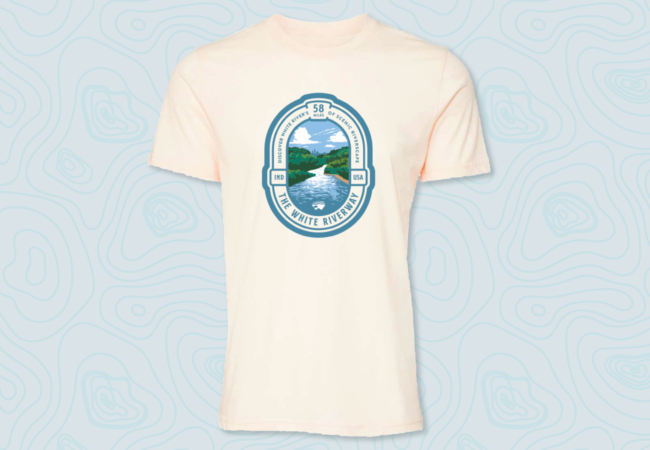
This super soft and lightweight BELLA+CANVAS tri-blend unisex tshirt features the White Riverway logo and is perfect for trailway strolls, riverbank fishing, or even concerts in a river park. Graphic print is 9×12 inches.
1000 points each
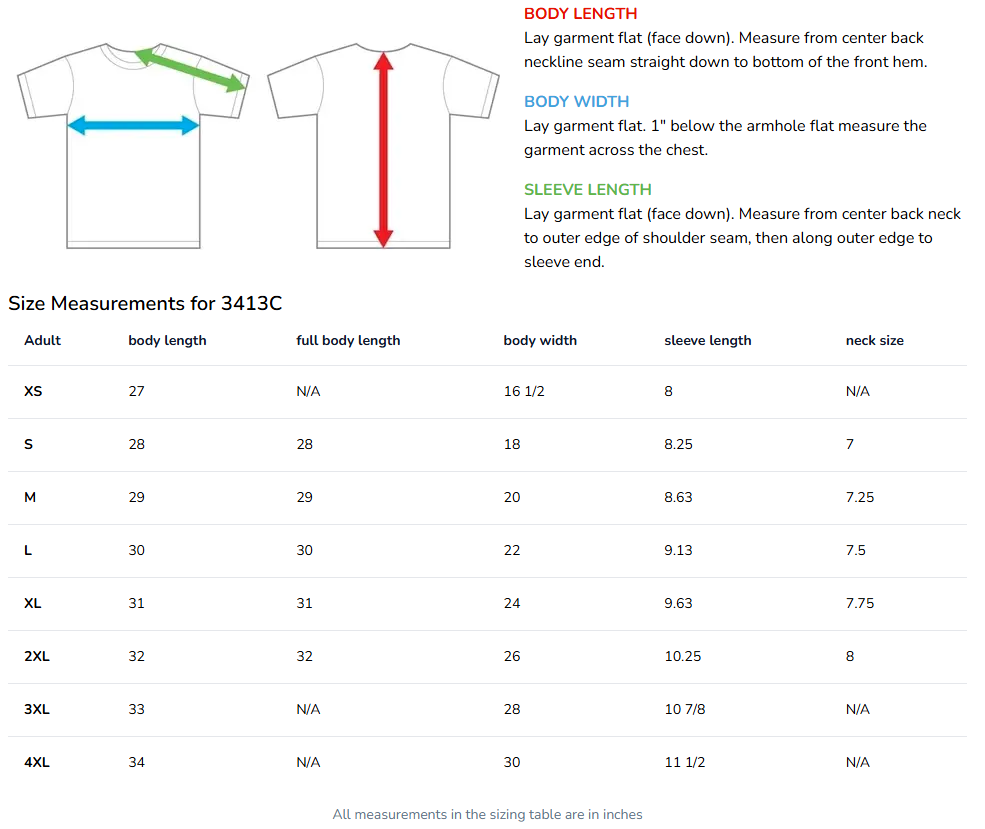
1000 points each | Sizes S-2X Sizing Info | Quantity limited
White Riverway Poster
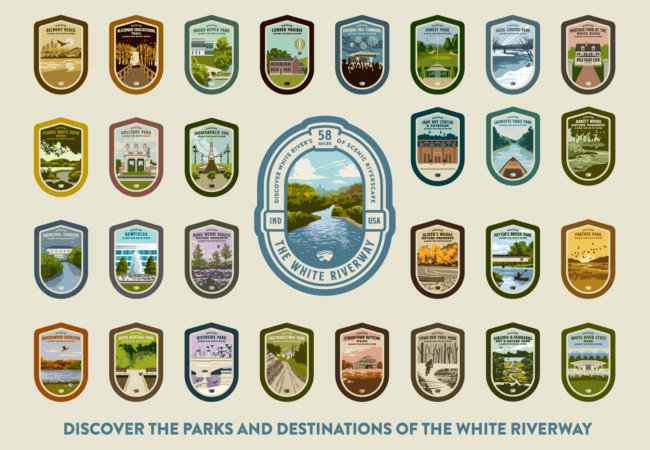
Show your love for the Riverway with this 18×24 poster print of all 28 park and attraction badges. Printed on thick paper ready for framing.
600 points | Quantity limited
Frequently Asked Questions
Scroll back to the top of the page and click on the “sign up” button.
Once you sign up, you’ll receive a link to your pass via text message and/or email. This link is your pass: there is no app to download. For convenience, in your phone’s browser, click the three dots (more) menu and choose to “Add to Home screen” to put an icon on your phone’s screen for easy access in the future. You can also bookmark it in your phone’s browser.
When you’re in one of the participating locations, you’ll just open the pass in your browser, allow it to access your GPS location, and check in.
For the volunteer activities, there will be a QR-code provided to you by the activity organizer.
You’ll need to allow the pass, which is just your browser, to use precise GPS location. The first time you visit the pass it will ask and you’ll want to allow. If you accidentally do not, how to re-enable location varies by phone and browser.
Safari on iPhone
- In the Safari address bar, click the puzzle piece looking icon.
- Click on the three dots (more) at the bottom right corner.
- Tap on Location and choose either Ask or Allow.
Chrome on iPhone
- Open the main settings on your phone
- Tap on “Privacy & Security” and then “Location Services”
- Scroll down and find Chrome.
- Choose either “while using the app” or “ask next time.”
- Revisit the pass website in Chrome and it should prompt you again to allow access.
Chrome on Android
- In Chrome, tap the padlock or the two lines with two circles icon on the left side of the address bar.
- Tap “Permissions” and either reset or tap “Location” and allow access.
You’ll see by each check-in in the pass. Checking in to a park, destination, or activity is worth 100 points each, while checking in to a volunteer activity is worth 400 points.
In your pass you’ll click on the “Rewards” button to browse the available prizes. If you have enough points, you’ll be able to click on the “Claim Now” button. As long as you’ve provided us your mailing address we’ll mail the prizes to you. We do this at least monthly.
You can earn rewards April through October 31, 2026, and you’ll be able to redeem them until November 30, 2026. Any unredeemed rewards left after that time expire.
Yes. You are limited to redeeming each reward only once. Also, rewards have limited quantities and are only available while supplies last.
Oh no! In your pass you’ll be able to reach out to support for help. Note that participating locations will not be able to provide any assistance with the pass. We can’t provide technical support, but if you have any other questions you can also reach out to us at [email protected].